
Every appointment-based business runs into the same quiet problem: a client cancels at 9 a.m., and the 2 p.m. slot sits empty while you eat the lost income. The fix is not a fancier calendar or a stricter policy. The fix is a ready list of people who want that time. Learning how to build a client waitlist from scratch is the single most reliable way to turn those gaps back into paid appointments.
The good news is that you already have everything you need to start. You have clients who ask to be squeezed in, regulars who would happily come sooner, and new faces who could not get the time they wanted. A waitlist simply organizes those people so that when a spot opens, you can fill it in minutes instead of hours.
Why a client waitlist is worth building
Think about what an open slot actually costs you. It is not just the service fee. It is the tip, the retail add-on, the rebooking, and the goodwill of a client who wanted that exact time but got turned away. When you multiply one empty chair by a few times a week, the number gets uncomfortable fast.
A waitlist flips that math. Instead of scrambling to fill a cancellation, you already know who is waiting and how to reach them. You stop losing revenue to last-minute cancellations and schedule changes, and your regulars feel taken care of because you can offer them earlier times as soon as they free up.
How to build a client waitlist from scratch
Starting a waitlist does not require special software or a big time investment. It requires a system you will actually keep up with. Here is a simple, practical order of operations that works for salons, studios, clinics, and solo pros alike.
Start with the clients you already have
Your best waitlist candidates are people who already trust you. Look at three groups: clients who regularly ask if anything opens up sooner, clients who booked further out than they wanted, and loyal regulars who would jump at a better time. These people are pre-sold. All you are doing is giving them a way to say "text me if something opens."
Ask them directly at checkout. A quick line like "Want me to add you to my waitlist in case an earlier spot opens?" gets a yes almost every time. Capture their name, the service they want, and the days or times that actually work for them, because a waitlist is only useful if the offers you send match real availability.
Keep no-shows from starving your list
A waitlist can only fill an opening it knows about, and a true no-show gives you no notice, so there is nothing to offer anyone. That is why the healthiest waitlists sit next to a few simple habits of your own that nudge people to cancel early instead of vanishing: send your own reminder the day before, ask for a quick confirmation, keep a clear cancellation policy, and consider a deposit for high-demand times. When a client cancels ahead of time instead of ghosting, that freed-up slot becomes something your waitlist can actually fill.
Turn your list into fast, filled appointments
Collecting names is the easy part. The hard part is speed. When a cancellation lands, you usually have a narrow window before that time is worthless, and calling people one by one rarely beats the clock. The client who books is almost always the one who heard about the opening first.
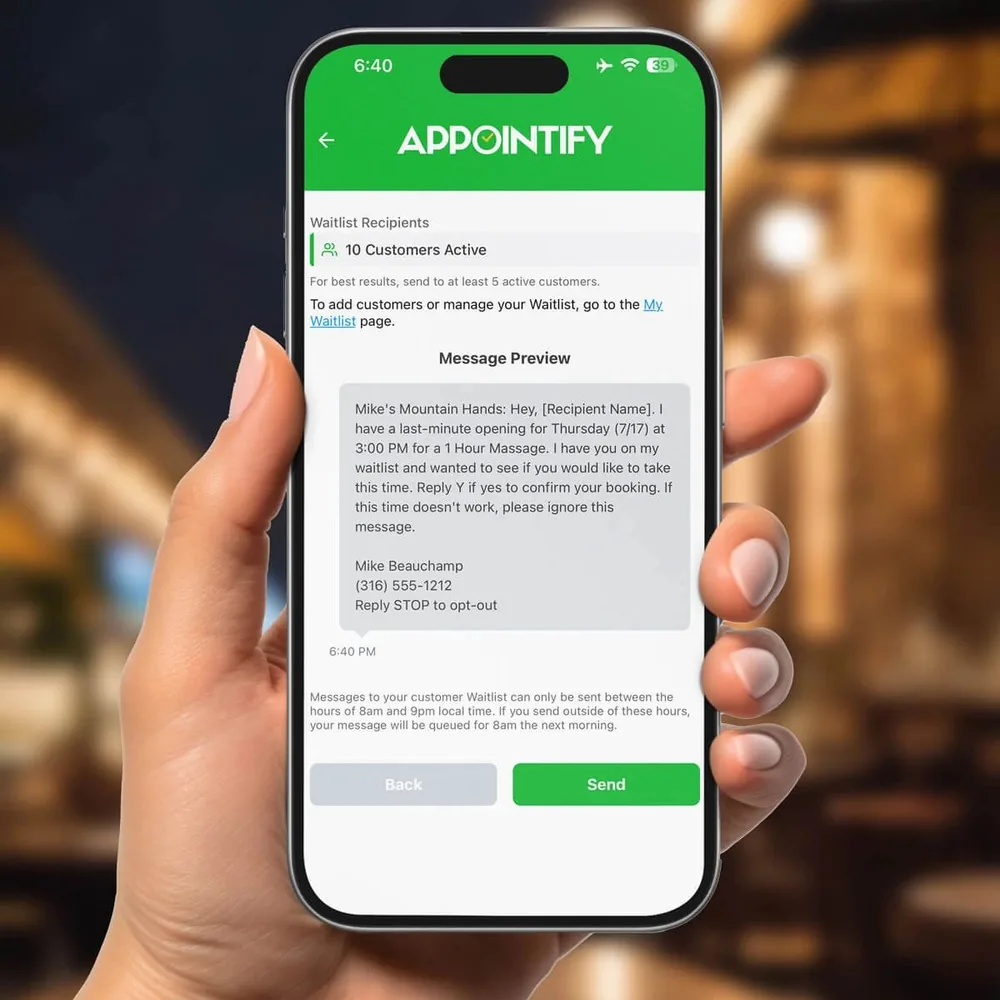
This is where doing it by hand breaks down. Manual texting means digging through your phone, remembering who wanted what, and hoping the first person you reach is free. Miss by twenty minutes and the slot is dead. That is exactly the gap Appointify was built to close: when a client cancels and frees a spot, it instantly texts your in-app waitlist, and the first client to reply books that opening. It runs alongside the booking or scheduling software you already use, so you are adding a fill engine, not replacing your system. Appointify is a free app for iPhone and Android, sets up in a few minutes, and never charges per booking, so there is no downside to keeping a waitlist running in the background.
If you want to see how quickly a text-based waitlist fills a last-minute cancellation, you can download the free Appointify app and load your list in one sitting. It is a natural fit whether you run a waitlist app for hair salons or need a waitlist app for massage therapists, because the core problem is the same everywhere: an open time and a line of people who want it.
Keep your waitlist healthy over time
A waitlist is not a one-time project. It is a living list that works best when you tend it. A few small habits keep it valuable month after month, so the next opening fills itself instead of costing you money.
- Add people continuously, not just when things are slow. Every checkout is a chance to grow the list.
- Note real preferences, including which days and times each client can actually make, so your offers land.
- Remove clients who have moved on or booked elsewhere, so your list stays current and your offers stay relevant.
- Respond fast when someone claims a slot, and confirm it clearly so there is no double-booking confusion.
Over a few weeks, a well-kept waitlist becomes one of your most valuable business assets. Cancellations stop feeling like losses and start feeling like opportunities to serve someone who was already waiting. Your calendar stays full without extra marketing, and your regulars get the earlier times they wanted.
Put your waitlist to work today
You do not need to overthink this. Start a list with the clients you already know, capture their preferred times, and give yourself a fast way to reach everyone at once when a spot opens. That is the whole system, and it pays for itself the first time you fill a cancellation you would have otherwise lost.