
When a client cancels an hour before their appointment, you have a choice: let that slot sit empty, or fill it fast. The quickest way to fill it is to text clients when a spot opens, and reach the people who already want in. A good text lands in seconds, gets read almost immediately, and turns a dead hour into paid work.
The tricky part is doing it well. Blast the wrong message to the wrong list and you annoy people. Send it too slowly and the slot goes cold. Below is a practical playbook for texting clients the moment an opening appears, plus a way to make the whole thing automatic.
Why texting beats calling when a spot opens up
Phone calls feel personal, but they are slow and easy to miss. You dial one client, get voicemail, hang up, and try the next. By the time someone finally picks up, twenty minutes have passed and the slot is still empty. A text does the opposite. It reaches everyone at once, it does not interrupt anyone mid-meeting, and it lets clients reply on their own time, which is usually within a few minutes.
Texting also creates a written record of who said yes first. That matters when two people want the same slot. Instead of guessing or double-booking, you can point to the first reply and book with confidence. And because most people keep their phones within arm's reach, a well-timed message about an open appointment tends to get answered faster than almost anything else you send.
How to text clients when a spot opens (step by step)
The goal is to move quickly without sounding frantic. Keep a short list of clients who have told you they want an earlier or sooner appointment, and reach out to that group the instant a cancellation hits your calendar. Here is a simple order of operations that works for most appointment businesses.
- Confirm the exact time and service that just opened, so there is no confusion in the message.
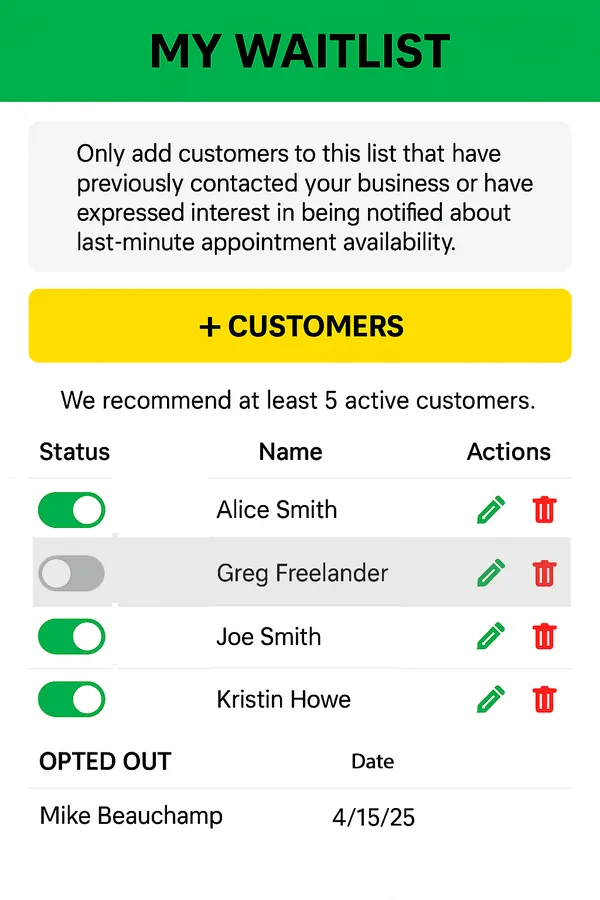
- Pull up your waitlist of clients who asked to come in sooner.
- Send one clear text with the day, time, and how to claim the slot.
- Book the first person who replies yes, then let the others know it is filled.
- Update your calendar so the slot no longer shows as available.
Speed is everything here. The longer a slot sits open, the less likely someone can rearrange their day to take it. If you can send that first text within a minute or two of the cancellation, you give clients enough runway to say yes and still make it in.
One more tip: text the whole interested group at once rather than one person at a time. If you only ask a single client and they say no, you have lost precious minutes. Reaching everyone together and booking the first reply is far faster, and it is the same idea behind how Appointify fills last-minute cancellations automatically.
What a good "spot just opened" text looks like
Keep it short, specific, and easy to answer. Lead with the opening, name the time, and give a clear way to grab it. Something like: "Hi Jordan, a 2:00 PM spot just opened today. Want it? Reply YES and it's yours." That message respects the client's time, tells them exactly what is available, and makes saying yes a one-word task. Avoid long paragraphs, avoid vague phrasing like "we might have something," and always include the date so nobody has to ask.
Make it automatic instead of manual
Doing all of this by hand works, but it depends on you being at your desk with your client list open the moment someone cancels. That is not always realistic when you are mid-appointment or between clients. This is where a waitlist app earns its keep. Instead of you scrambling to text people, the app texts your waitlist the instant a slot frees up, and the first client to reply books it.
Appointify does exactly that, and it is free with no per-booking fees and no credit card required. It runs alongside the booking or scheduling software you already use, so you are not ripping anything out or starting over. Setup takes just a few minutes. You can download the free Appointify app on iPhone or Android, add the clients who want in sooner, and let the app handle the texting when a cancellation shows up.
Because Appointify only messages the people who opted into your waitlist, you are never spamming your whole client base. The right clients hear about the opening, the first one claims it, and everyone else is quietly told it is taken. Businesses of every kind use this, whether you run a solo practice or a busy team, and there is even a version tailored as a waitlist app for hair salons and other appointment-based trades.
Start filling openings the moment they happen
An empty slot is lost income you can rarely earn back. The businesses that stay full are not lucky, they are fast. They text the right clients the second a spot opens, book the first yes, and move on. You can do that manually with a tight list and a quick thumb, or you can let an app do it for you around the clock. Either way, the message is the same: reach interested clients right away, make saying yes effortless, and never let a cancellation turn into a wasted hour.