
If you run an appointment-based business, you already know the sting of a cancellation that comes in an hour before the slot. The chair sits empty, the revenue is gone, and there was never enough time to fill it by hand. A waitlist app is the tool that solves exactly that problem: it keeps a ready list of clients who want an earlier or sooner appointment, and it lets you offer an open slot to all of them in seconds instead of working the phone one call at a time.
In this guide, you will learn what a waitlist app actually does, how it is different from the scheduler you may already use, and how to tell whether one is worth adding to your setup. The short version: it is a small, focused tool that turns your cancellations into rebookings without adding work to your day.
What is a waitlist app, exactly?
A waitlist app is a simple piece of software that stores a list of your clients who are willing to take an appointment on short notice. When a slot opens up, whether from a last-minute cancellation, a reschedule, or a gap you want to fill, the app instantly notifies the people on that list. The first client to say yes claims the slot, and the opening is filled before it has a chance to cost you anything.
Think of it as the digital version of the paper "call list" a lot of front desks keep taped near the register. The difference is speed and reach. Instead of dialing names one by one and hoping someone picks up, the app texts everyone at once and books whoever replies first. What used to take twenty minutes of phone tag now happens on its own.
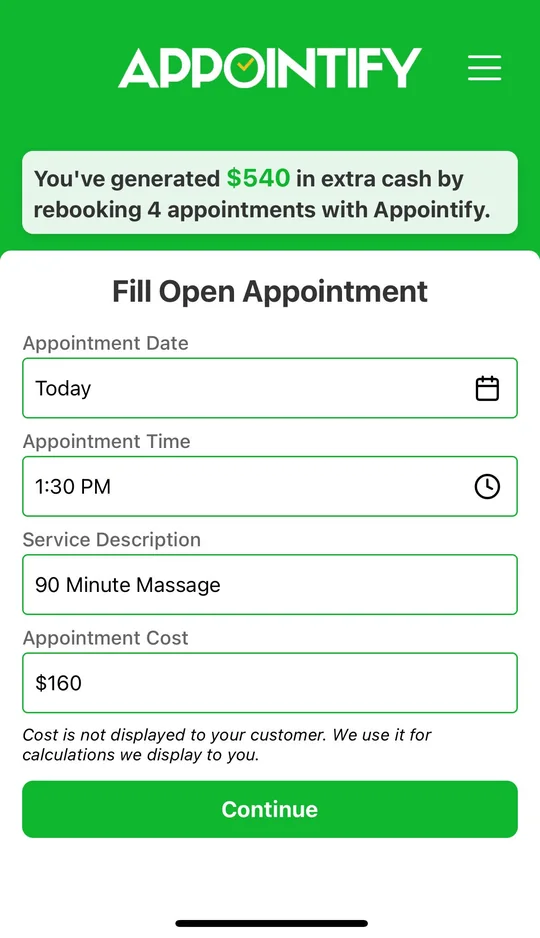
That is the whole idea. A waitlist app is not trying to run your entire business. It does one job, filling openings fast, and it does it well. Appointify, for example, is a free mobile app that texts your in-app waitlist the moment a spot opens, and the first client to reply books it. You can see exactly how Appointify fills last-minute cancellations and why the "first to reply wins" approach works so well for busy shops.
How a waitlist app works, step by step
The mechanics are refreshingly plain. Once you have the app set up, the process runs like this for every opening you get:
- Clients join your waitlist. People who want a sooner appointment add themselves, or you add them, so you always have a pool of ready-to-book clients.
- A slot opens up. A client cancels, reschedules, or you simply have a gap you would rather not leave empty.
- The app sends a text. With one tap, everyone on the waitlist gets a message that the slot is available.
- The first reply wins. Whoever responds first books the slot, and the app closes the offer so you never double-book.
Because the whole thing is text-based, clients see the offer within seconds and can claim it from wherever they are. There is no app for them to learn, no login, no back-and-forth. That low friction is a big part of why waitlist texts get answered so quickly compared with a voicemail that sits unheard until the evening.
The best part is that it runs quietly in the background of your day. You do not have to remember to send anything or babysit a list. When a cancellation lands, you tap once and get back to your current client while the app does the chasing for you.
Waitlist app vs. scheduling software: what's the difference?
This is the question that trips people up most, so it is worth being clear. Your scheduling or booking software is where clients pick a time, where your calendar lives, and where you manage the day. A waitlist app does not replace any of that. It sits alongside your existing tools and handles the one thing schedulers are weak at: filling a slot after it has already emptied out.
A calendar can show you that you have a hole at 2 p.m. It cannot go out and find someone to fill it. That gap is where a waitlist app earns its keep. You keep booking clients however you do it today, and you add a lightweight layer on top that springs into action the moment something falls through.
A good waitlist app is also purpose-built for the way a particular trade actually works, since a salon's rhythm is nothing like a dental office's. If you want to see the differences up close, take a look at a waitlist app built for your industry so the workflow matches how you already run your book.
Do you actually need a waitlist app?
Not every business does, and it is fair to ask. The clearest sign you would benefit is simple: you regularly have clients who would happily come in sooner if only a spot opened up, and you regularly have spots open up. When both of those are true, a waitlist app is close to free money, because the demand and the supply already exist. You are just connecting them faster.
It is also worth weighing the cost of doing nothing. Every unfilled cancellation is revenue that walks out the door and does not come back. A few empty slots a week adds up to real money over a year, and none of it required extra marketing or new clients to recover. You already had the interested people on hand.
Cost is rarely the barrier either. A waitlist app should be quick to set up and should not lock you into a contract or per-booking fees just to try it. Appointify is always free, needs no credit card, and installs in a few minutes, so there is little downside to testing whether it fills your gaps. It is a mobile app, not a full scheduler or a payment processor, which keeps it focused and easy to add to what you already run.
Getting started is quick
A waitlist app is one of those tools that pays for itself the first time it saves a slot. If you have been eating the cost of last-minute cancellations, the fastest fix is to put a ready list of clients behind every opening so nothing sits empty by default. You can be up and running in the time it takes to finish your coffee, and your very next cancellation could be filled before you have even processed that it happened. When you are ready, download the free Appointify app and try it on your next open slot.